Google Ads audit: how I found $1,234 in fake clicks
The Trades Titan exists for one reason. To help home service business owners scale through marketing without the confusion and build a legacy worth having.
Every week that means one real finding from inside real contractor accounts. No fluff. No theory. Just what is actually happening right now and exactly what to do about it.
Last week I covered how Google quietly routes your ad budget to mobile gaming apps and exactly how to block it. If you missed it: how to block Google Ads click fraud from gaming apps
This week: how to find out how much has already been stolen and build the case to get it back.
$1,234 in fake clicks. Inside one Google Ads account.
Money the owner thought was buying leads.
Not to homeowners searching for a contractor.
To bots. Mobile games. Search Partner sites that spent real money with zero calls.
None of it showed up on the dashboard.
I ran the same audit across several other accounts we manage. I found wasted spend in those too. None of these owners had any idea.
Here's exactly how I found it.
Get one real fix like this every week. The Trades Titan is a free weekly email for business owners. Subscribe free at thetradestitan.com
The Google Ads audit: four reports that expose everything
Each one takes less than 5 minutes to pull. Together they show you exactly where your money went.
Report 1: The PMax placement report
This shows every app and website where Google actually ran your ads.
Campaigns → Insights and Reports → Report Editor → Create Report → Dropdown: When and Where Ads Showed → Performance Max Campaigns Placement → Download → CSV
What you're looking for: mobile apps and gaming categories. If your ad ran inside Block Blast or My Talking Tom, it's in here. Write it down. That's your evidence.
Report 2: When ads showed
This is where I found middle of the night click rates that no real homeowner would ever produce.
Campaigns → Insights and Reports → When and Where Ads Showed → When Ads Showed
What you're looking for: CTR between 11pm and 6am. Above 15% is a red flag. Above 30% is bots.
Report 3: Where ads showed
This shows which websites your ads appeared on. This is where you find the garbage sites quietly eating your budget.
Campaigns → Insights and Reports → When and Where Ads Showed → Where Ads Showed → Download → CSV
What you're looking for: sort by spend. CTR above 10% on a site you've never heard of? Almost certainly bots.
Report 4: Device report
Tablets and TV screens almost never convert for home service businesses.
Campaigns → Insights and Reports → When and Where Ads Showed → Devices tab
What you're looking for: spend on tablets or TV screens with zero conversions. In the account I audited, Google charged for TV screen clicks even though a -100% bid adjustment had been set to block them. The algorithm ignored its own settings and spent the money anyway.
Build your evidence file in minutes, not hours
You've got four CSV files now. Don't touch Excel.
Open ChatGPT or Gemini. Upload all four files. Paste this exact prompt:
"I am a [roofer / plumber / HVAC contractor]. Analyze this Google Ads data as a forensics expert. Find placements or timing that look like fraud. Add up the total wasted spend. Look for apps or websites with lots of clicks but no conversions. Make a table showing the bad placements, wasted clicks, and total money spent. Include everything needed to prove to Google we deserve a refund."
The AI builds your evidence table in seconds. Save it. You'll need it next week.
Check this before anything else: invalid activity credits
See if Google already quietly credited your account.
Billing → Summary → look for "Invalid Activity"
If there's a credit, Google caught some of it. Good. But their filters only catch a fraction of what's actually hitting your account. That credit is almost always smaller than the real problem.
The gap between what Google credited and what was actually stolen is what we're going after next week.
Titan insight
The most dangerous line in your Google Ads account isn't your cost per click.
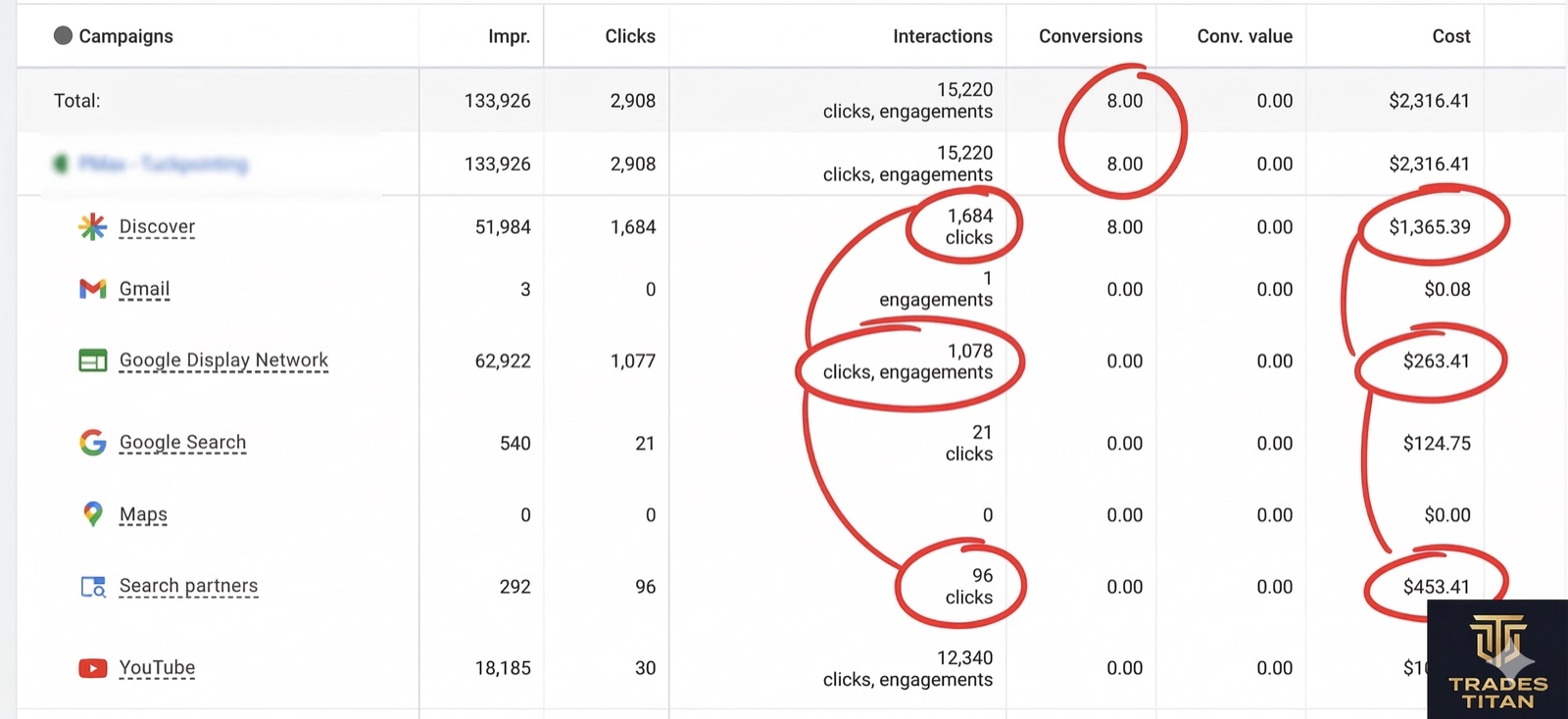
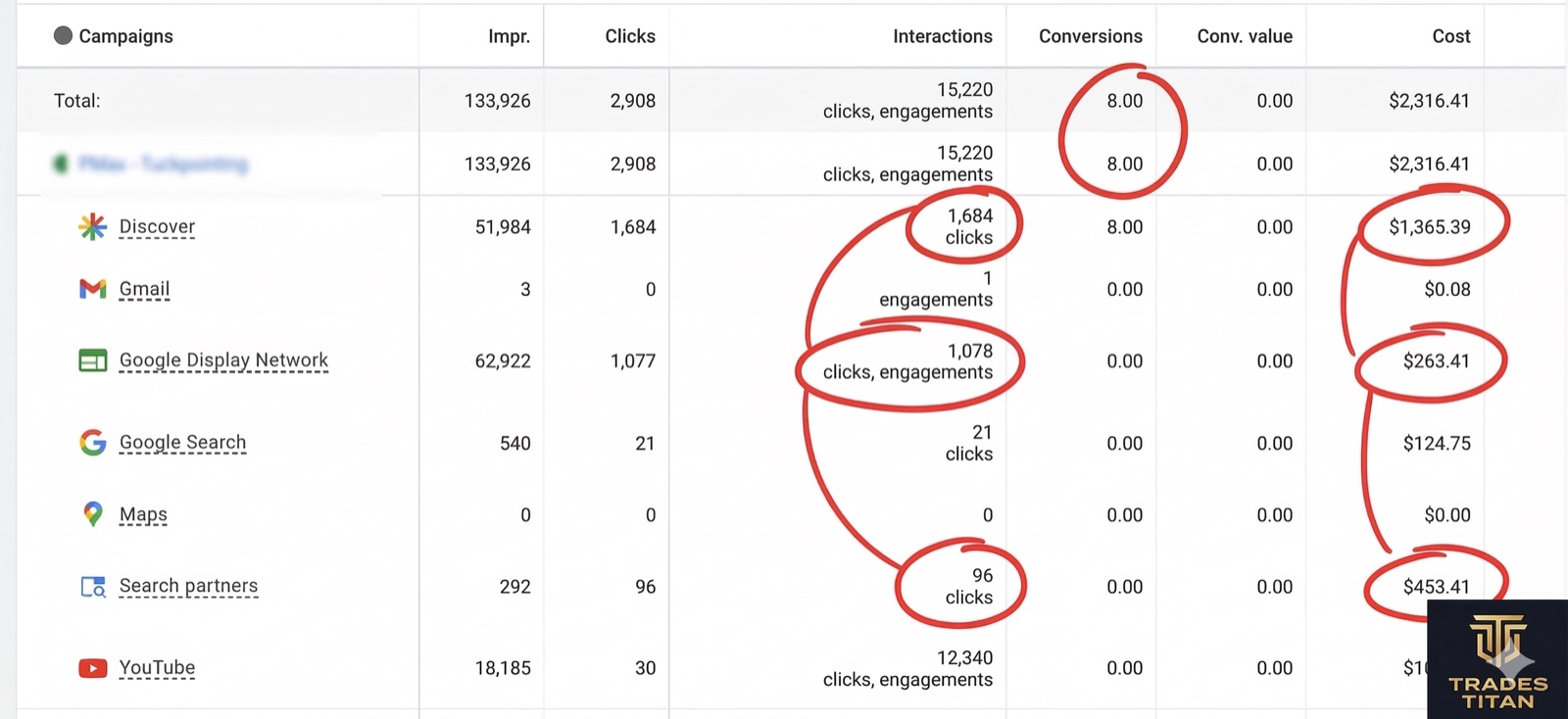
It's Search Partners spend with zero conversions.
In one account: hundreds of dollars spent. Lots of clicks. Zero calls.
Pull that report today. If you see the same pattern, you have a case worth filing.
Next week I'll show you the exact form to file your claim with Google. The exact language that gets it treated as a systemic failure instead of a routine complaint. And what to do if they say no.
That's it for this week.
One audit. Four reports. One evidence file.
If this helped, forward it to a contractor friend running Google Ads. The 60-day refund window is already running on their account right now.
Talk soon,
Paul
Paul Parnell
Founder, Level Up | The Trades Titan
Helping business owners scale with AI and marketing
thetradestitan.com
P.P.S. Someone forward this to you? Subscribe free at thetradestitan.com
Common questions
How do I check for invalid clicks in Google Ads?
Go to Billing, then Summary, and look for "Invalid Activity." A credit there means Google caught some of it, but that credit is almost always smaller than the real problem.
What click-through rate means bots are clicking my ads?
Check CTR between 11pm and 6am. Above 15% is a red flag. Above 30% is bots.
How long does a Google Ads audit take?
Each of the four reports takes less than 5 minutes to pull. Upload the CSVs to ChatGPT or Gemini and it builds your evidence table in seconds.
Keep reading
- Google Ads click fraud: the hidden drain on your budget
- Google Ads refund form: how to claim invalid clicks
Want the next issue in your inbox? One finding. One fix. Every week. Free. Subscribe at thetradestitan.com